

A consultant card is visible to users worldwide whenever anyone approaches a client consultant platform. The consultant card is a crucial milestone for every platform.
According to current year estimates (2025-2026), UpWork has 18 million+ freelancers [Source: Demandsage].
Fiverr has 3,80,000 to 400,000 million active buyers in 2024 and 3.1 million in 2025 [Source: Earthweb].
Freelancer.com has 64 million+ users across 247 countries [Source: Jobbers].
Becoming a consultant with VirtUp also means creating a consultation card with us. A consultation card could not be taken to be equivalent to the number of users.
It is the first step in the process – the most important of all to start your VirtUp journey!
A consultant card is like a ticket to board the flight. It is your way to tell the VirtUp AI algorithm that you exist. It is also a way to tell others – clients and fellow consultants – that you exist on the platform.
You have your profile with us.
Creating a consultation card is again a few seconds of work, given; you know the details you want to add to it.
Also, you can have multiple consultation cards under your account.
Below is the process we want you to follow when creating a consultation card.
Steps To Use for Creating the First Consultation Card
To create your consultation card, here are the steps you will need to follow.
This is a manual process since VirtUp would want you to add every detail manually here to ensure it is 100% accurate and correct to your knowledge.
You must remember that if you operate as a coach and an AI consultant, it is good to create two different consultation cards since your work involves expertise in two different directions.
Create the First Consultation Card
1. Here are the steps you need to follow for creating your first consultation card. Once you have the profile, look to your top right from the dashboard.
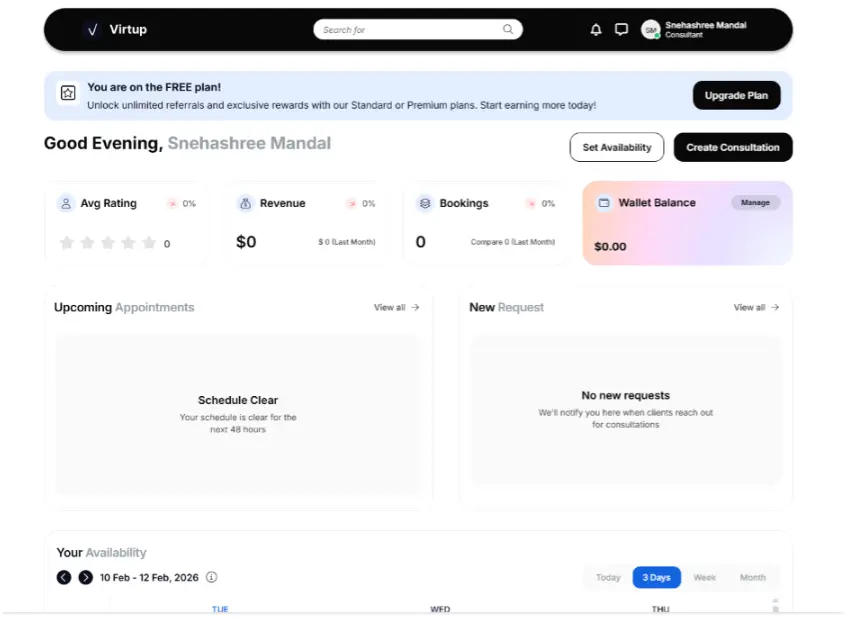
2. You will come to this page when you click on the consultation card tab.
There are three sections in the card that you will have to fill out.
- Consultation details
- Category and visibility
- Package and Pricing
Click on the Create Consultation Tab
The tab can be reached from your dashboard [My Consultation], and your profile [Add Consultation].
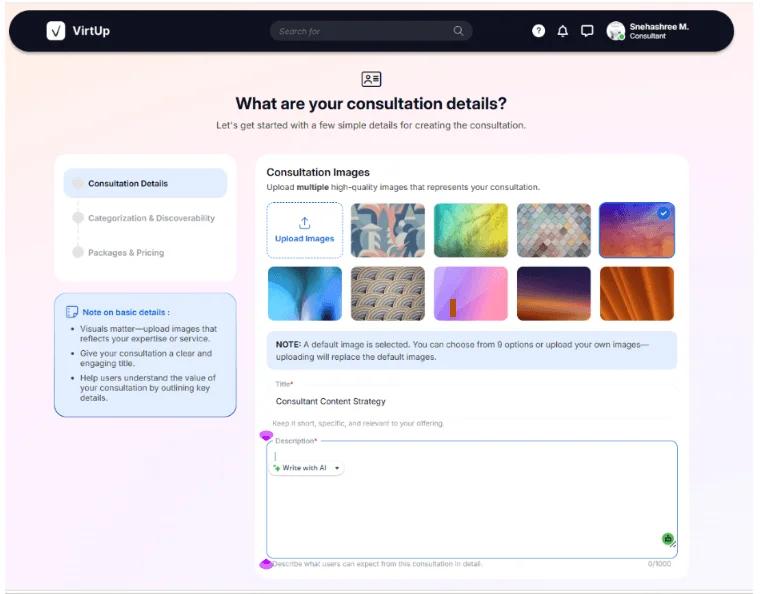
STEP ONE: Add The Consultation Details
In the Consultation Details segment, you will need to add any of the 9 images, or you could upload your own image.
Add a title and a description [character limit – 1000 characters] to it.
Mention what you could do in that particular aspect as an expert.
Write your description pertaining to only that part.
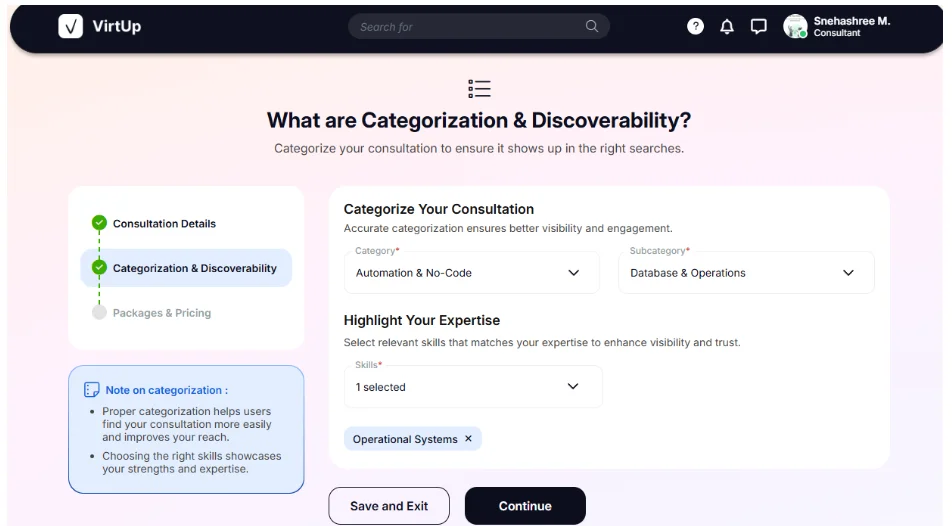
STEP TWO: Go To Categories and Discoverability
Create a Category and a sub-category for your consultation.
Be specific!
Choose one category and an additional sub-category for the consultation.
Choose a pack of skills from the already available bunch of skillsets that match the category and sub-category.
STEP THREE: Create the Packaging and Pricing Section Correctly
This is the most crucial section to attend.
Note: You can create a maximum of 3 pricing packages for the same consultation card.
If you are offering a service, your packages could involve a list of services which increase or decrease alongwith your pricing.
In every package, there are some sections to fill:
- Title: Add your Package title
- Duration: Time span of the consultation
- Price in USD: Calculate your pricing in USD
- Description: Add a brief description where you must highlight what you can do for a client in that particular segment. You can guide them to choose from the next two other packages as well in each package description.
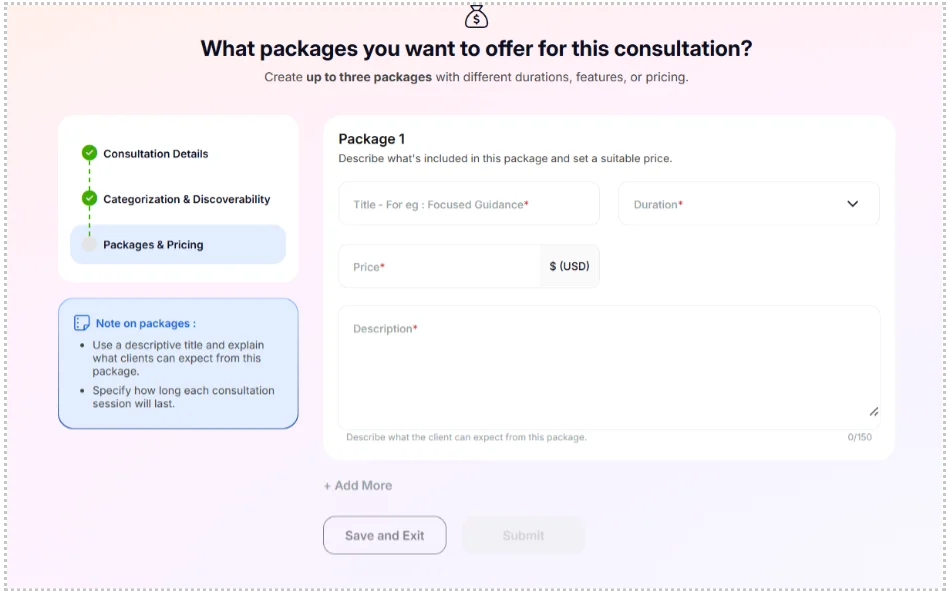
When you fill in Package 1, then the Add More tab gets activated.
You can add two more packages to complete the packages and pricing section.
Once done, the Submit tab gets activated, which means now you can submit your consultation card.
After you hit the Submit button, your consultation card is ready to get showcased to the clients who search for your kind of expertise and start getting flashed to these clients by the AI algorithm.
Isn’t it simpler to become a consultant with VirtUp?
Frequently Asked Questions
What is a consultation card?
We would describe the consultation card as a structured, ready-to-book offering. Instead of an informal request, a consultation card can offer organized, paid clarity proposals and sessions.
A consultation card will include: a clear scope of work, transparent pricing tiers, bookable slots with smart scheduling options, and a proper credibility anchor.
A consultation card will provide structure, set boundaries, and create paid clarity sessions.
What are the different sections to fill in?
A quick fill will involve a few sections – consultation details, categorization and discoverability, and packaging and pricing.
In the consultation section, add the title specific to the consultation type you want to cater to. Add a proper description as to why you’d be the right choice, and a photo specific to your capabilities.
In the category section, add your category, sub-category, and then five skillsets specific to that category and sub-category. It further defines what is possible from your end under the category.
Add proper pricing tiers like in at least 2-3 different levels for your clients to choose from.
How many skills can you add under a certain category?
You can add up to 5 skills under a certain category and sub-category. Be specific on what all skill sets you want to add to it.
Can you add more than one package to the consultation card?
Yes, you can add more than one package to the consultation card. Each package can be tiered – duration, pricing, and what all you want to do for each package and pricing option.
How long can the package description be, and how long can the original description be?
The package description can be 150 characters long, and the original description can be 1000 characters long.
When can you start adding the consultation card?
The consultation card will be live at the end of the beta phase. We will soon be deploying it, and effort is being made to complete the process sooner so that those already with a profile can create a consultation card and start the process sooner.