

“When onboarding a platform, a consultant must feel empowered, not overwhelmed; guided, not gated. That’s the future, platforms must be prepared to build.”
VirtUp is a virtual client-consultant platform, an upcoming and emerging one. Onboarding any platform can be overwhelming when you decide finally to become a consultant. Many questions swarm around one’s head when one is trying to choose a platform.
As a virtual consultant marketplace, VirtUp helps experts showcase their skills, connect with clients, and manage consultation opportunities through a flexible platform.
According to several reports, consultants are finding global markets through these platforms. But each of these platforms is prompting a compromise which consultants are often unwilling to make.
On an average, a consultant spends 20%-35% of their revenue on platform fees. This is just the beginning of the hidden costs [source: Consultingsuccess].
Additionally, there are race-to-the-bottom pricing challenges. The algorithmic nature of these platforms is such that visibility can vanish overnight. It seems like you’re building someone else’s business and not your own.
If any or all these problems resonate with you, know that VirtUp fully aligns with its consultants.
We are aligning VirtUp by bringing a solution to all these mentioned issues, and if you want to become a consultant with us, you may want to know what the platform can solve. We have tried answering all these questions.
What general queries a consultant or expert seeking work from a platform has in their minds when they see a new platform. Remember they are already experienced with platform nuances.
Usual Doubts of Becoming a Consultant with a Platform
| Control and Autonomy | Has VirtUp Addresses It? |
| Will I have full control over pricing, availability, and workflow? | ✔ |
| Can I manage client relationships freely, or am I restricted to platforms? | ✔ |
| Does the platform allow both on-platform and off-platform collaborations? | ✔ |
| Quality of Clients or Opportunities | Does VirtUp know the answer? |
| What type of clients can I find here? | ✔ |
| Do these global opportunities align with my expertise? | ✔ |
| Does the platform attract serious clients or mostly low-budget inquiries? | ✔ |
| Around Profile Visibility | |
| Will my profile be discovered? | ✔ |
| Does the platform help showcase the work? | ✔ |
| Can I bring my existing clients to maintain continuity and reputation? | ✔ |
| Matching Lead Generation | Does VirtUp have any details? |
| How does the platform match clients with me? | ✔ |
| Will I receive high-quality leads? | ✔ |
| How close to perfect is the matching system | ✔ |
| Workflow & Tools | Is VirtUp helping? |
| Does the platform support scheduling, messaging, and collaboration? | ✔ |
| Are there automation tools? | ✔ |
| Easy management of clients and projects on the platform? | ✔ |
| Earnings and Payments | What Does VirtUp Do |
| Will the platform take commissions from my earnings? | ✔ |
| What is the payment process – is it instant, reliable, and secure? | ✔ |
| Can I work with clients off the platform when getting them from the platform? | ✔ |
| Instant Flexibility and Freedom | VirtUp Offers |
| Will I be free to choose how many projects I can handle and when? | ✔ |
| Does the platform respect my downtime and availability settings? | ✔ |
| Can I jump from one-off consultations to long-term projects? | ✔ |
| Platform Culture and Support | VirtUp’s Ideas & Goals |
| Do the platform support consultants fairly and transparently? | ✔ |
| Is customer support responsive to issues? | ✔ |
| Are disputes handled in a consultant-friendly manner? | ✔ |
| Growth and Professional Development | Does VirtUp Support It? |
| Will this platform help me grow my consulting brand? | ✔ |
| Does it expand my visibility to the global markets? | ✔ |
| Are there resources, insights, and community benefits? | ✔ |
Major Attractions of VirtUp for A Start
VirtUp is feature-rich, AI-algorithm backed, and offers adequate balance and freedom to consultants.
Become a consultant with VirtUp to enjoy –
- No lock-ins
- Work on projects on-or-off-the-platform
- Collect reviews from these off-platform clients
- Enjoy a balanced ecosystem
- Streamlined booking process
- Insight-rich personalized profiles
- Algorithmic search process
- Transparent + instant financial transactions
- A view-all consultant calendar
- Actionable insightful analytics
- A comprehensive dashboard
- Secure and fair payment process
- A two-way review system
If you are convinced this is your platform – then here’s how you can quickly create your profile.
Also, before we mention the steps, we would like to share a plan we have in place for our consultants.
Become a Consultant – Join Our 100-Cohort Group
We are currently recruiting the 100-cohort consultants.
What do you gain if you became a part of this process?
| What does VirtUp bring you? |
VirtUp 100 Cohort |
What Do You Get with VirtUp? |
| No subscription fee for 2 years | Create One Consultation Card on VirtUp | |
| Get a Feature Founding Badge | Share the VirtUp link on your social media channels | |
| Visibility & Credibility Improve | Tell us what we can do about the site more | |
| Improve Call Booking Opportunities | ||
| Revenue Boost | ||
| Commission Free Option | ||
| Inbound Demand Access on Priority | ||
| Make suggestions about the platform |
With all these benefits, we are drawing quite a fair number of consultants to the platform, and we are selecting a consultant almost every day.
Moving ahead, we provide a detailed, step-by-step guide for creating a profile on VirtUp.
How To Create a Profile to Become a Consultant on VirtUp
To become a consultant, you will need to create your profile; it just takes you 5 minutes.
To create your consultation card, given you have all the details handy, it could take you somewhere around 15 minutes.
First steps first – here are the steps to create your profile on VirtUp followed by the steps to create your consultation card on the platform.
First Step to Becoming a Consultant – Create Your Profile
How do you become a consultant with VirtUp? Here are a few quick steps to follow.
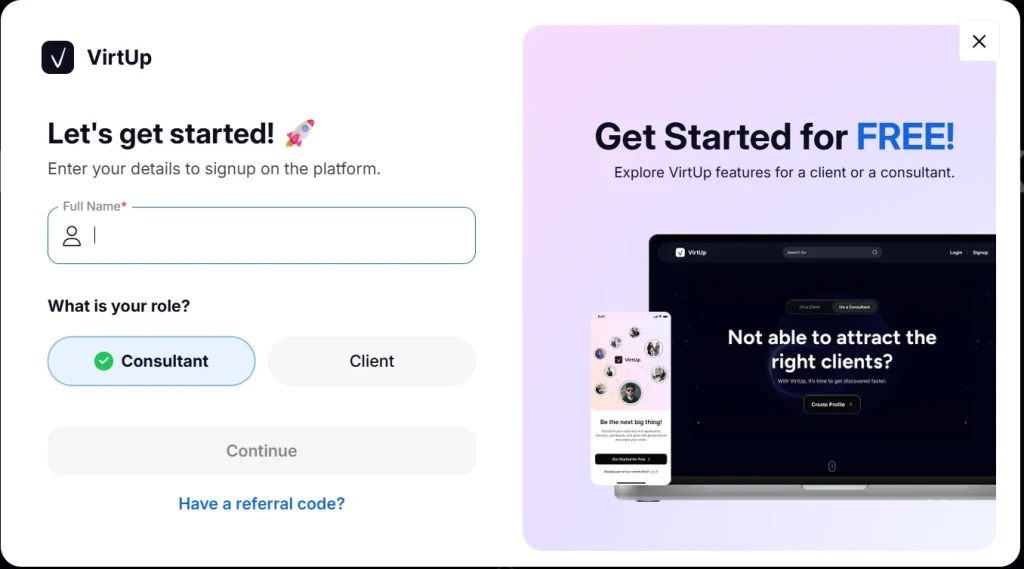
STEP 1: Sign in or Create Your Account
To create your profile, the first step is to add your email ID and then a code that arrives in your email.
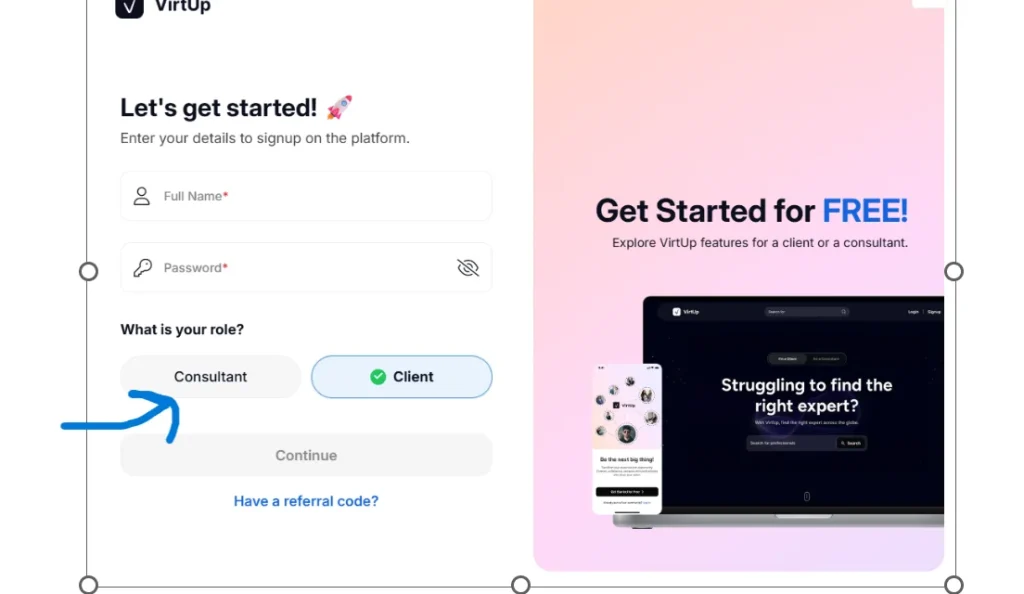
STEP 2: Name and Password
Add your name and password you could use to sign in next to the sequence.
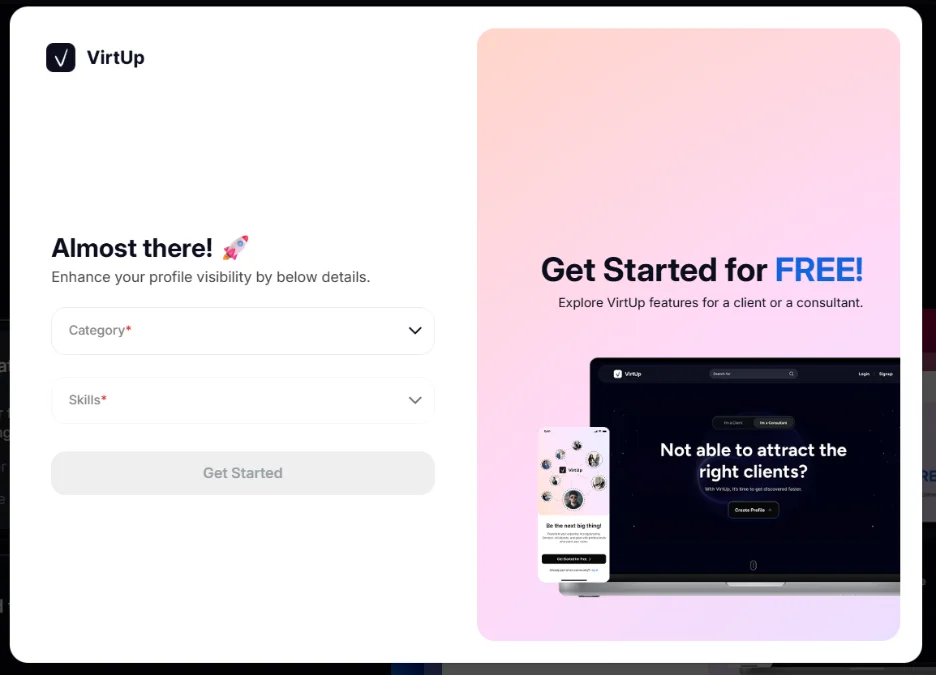
STEP 3: Add categories and relevant skills
Choose all those categories you want to create a consultation card for.
Add the relevant skill set list right here.
This step is crucial since you can later create a consultation card only for those categories that you’ve selected here on this screen.
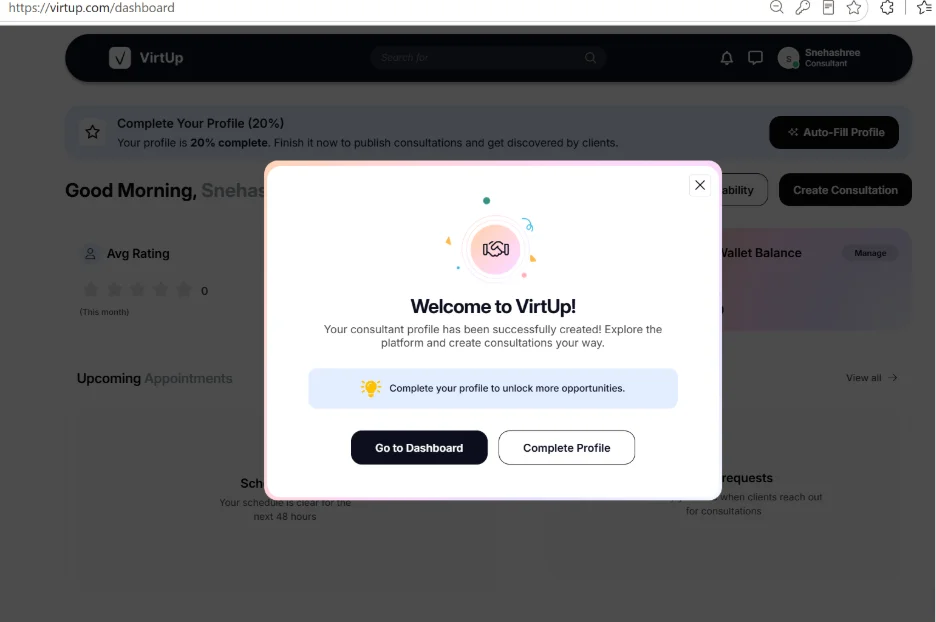
STEP 4: Click on the Complete Profile Tab
The Go to Dashboard Tab is designed to take you to your dashboard, your own personal dashboard.
But then, you need to complete your profile before that, and you need to thus click on the Complete Profile tab.
STEP 5: Complete Profile to Become a Consultant
You have 3 choices to use to fill your profile – complete it manually, import your LinkedIn profile, or add your resume.
Choose whichever seems fit for you.
- If you already have an updated LinkedIn profile, then importing your profile from LinkedIn would be the best option.
To do it, you will need to click on the three dots in your LinkedIn profile. Download the PDF format of your LinkedIn profile and upload the same file from your personal Downloads segment to this portion.
When you click on the LinkedIn tab, you will be taken to a screen where you can drop in your pdf file.
Soon after, the platform will redact all the information from the file and add them to the relevant sections which include:
- Portfolio
- Education
- Certifications
- Languages
- Experience and
- Website
Also, you will separately need to add your profile picture which cannot be auto uploaded from your LinkedIn profile.
Rest everything else will get copied from LinkedIn.
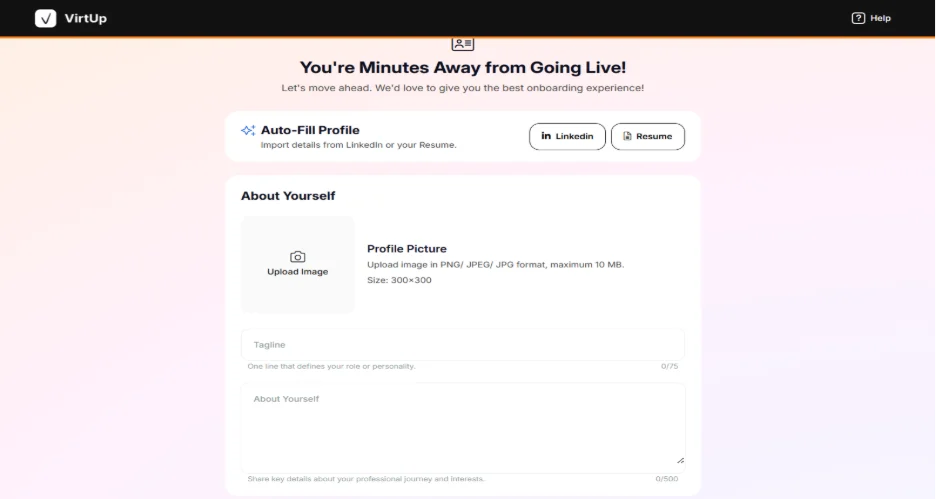
STEP 6: Check all the profile details once – Browse Through
Browse through all the screens.
If you have added your resume or your LinkedIn CV, then the Save button will be greyed out.
But if you are manually filling up the profile, then you have to keep saving each screen before moving to the next.
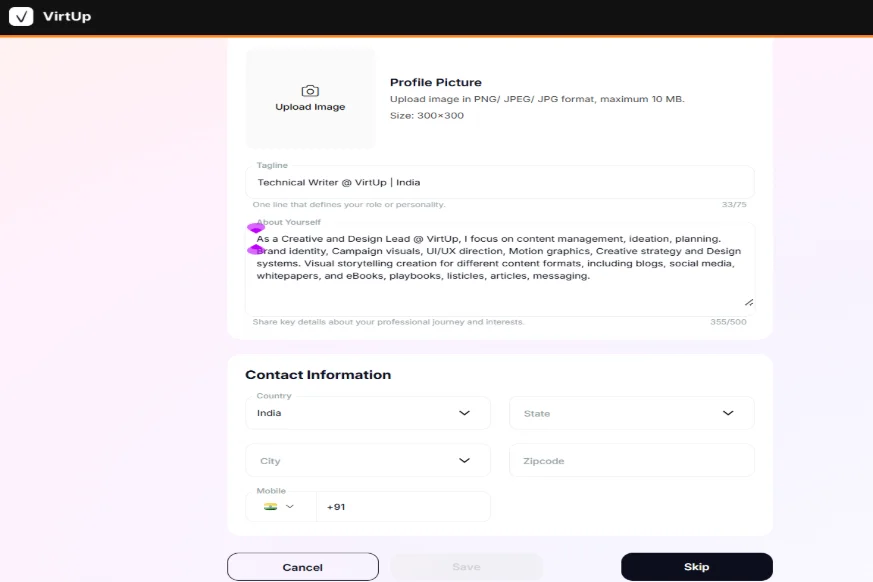
STEP 7: Add Newer Details If Necessary
If you want to add newer details like newer contact information or other relevant educational skills, you can do that manually here, and the Save button will be activated. Press the Save button to save the new information that you added here and the one that has not been there on your CV or LinkedIn profile.
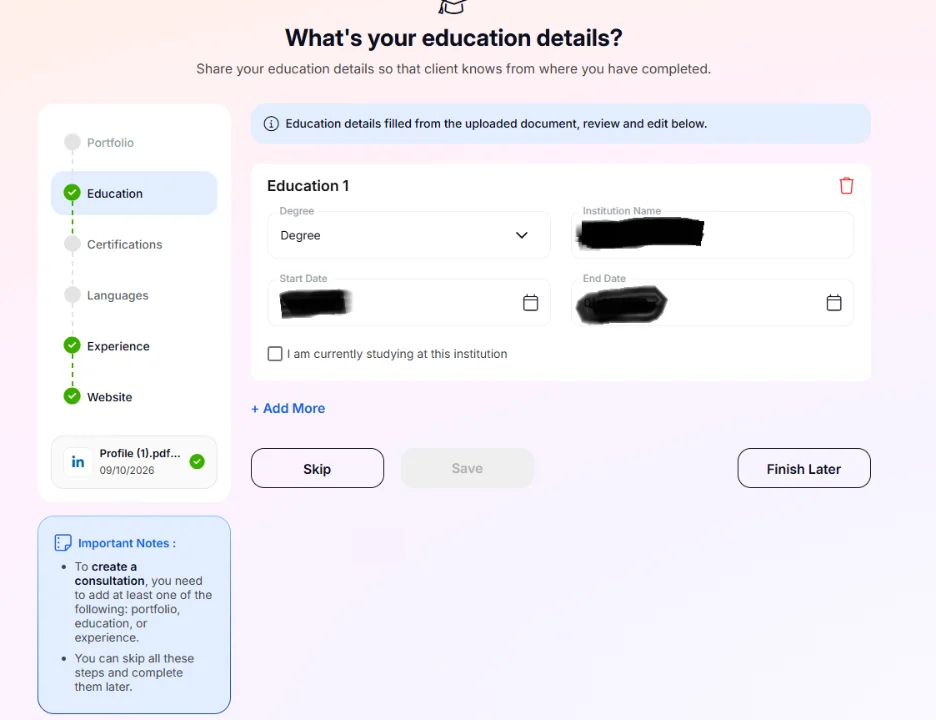
If you want to finish later, you can click on the Finish Later tab and pick up where you left whenever you return to it.
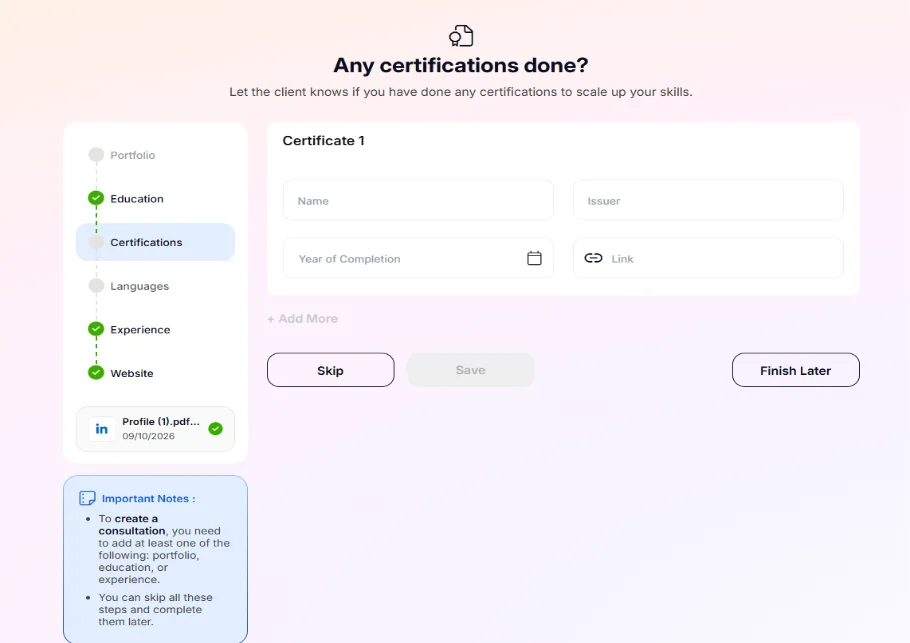
Check your certifications and add any that you might feel; you left out on your LinkedIn and resume.
Your online profile here is to draw attention, create an impression, and to highlight your efficiency level in different perspectives and areas.
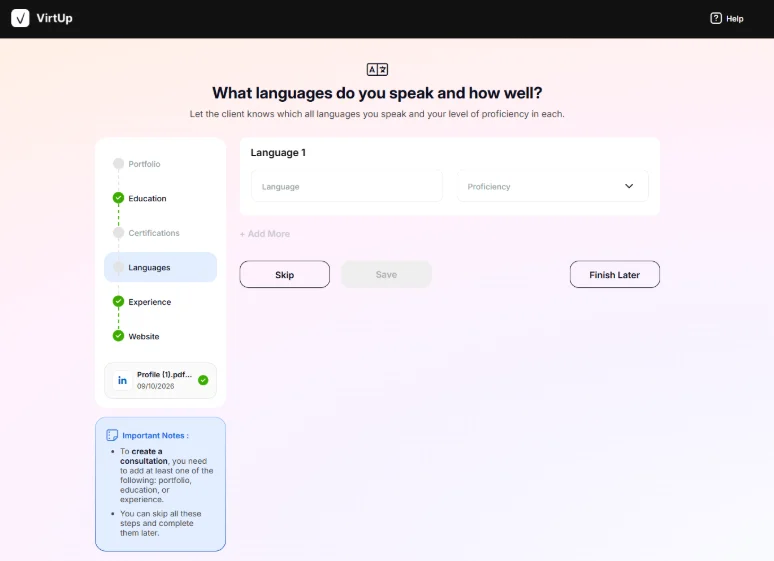
Add languages if you have any more interesting ones.
Specifically, if you are a translator, adding any new languages you learned could land you good projects.
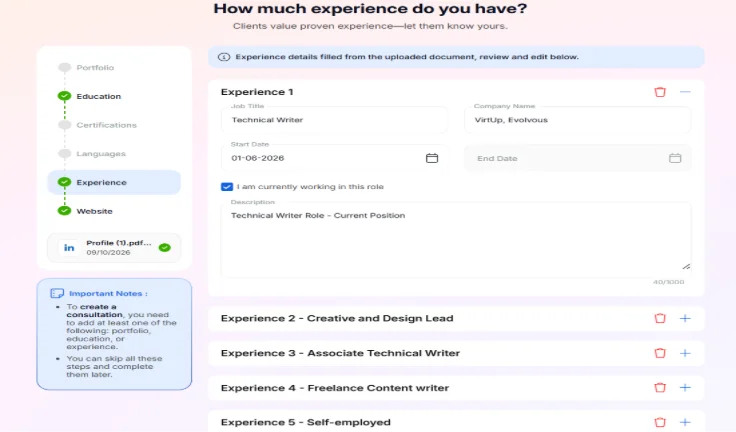
Add more to your experience.
Most often there are millions of trivial things you are doing every day that you’re not adding to your LinkedIn profile. But these trivial things could have a lot of impact on your consulting business. They can create a first impression, tell a bit more about yourself, and help you stand out in a crowded room.
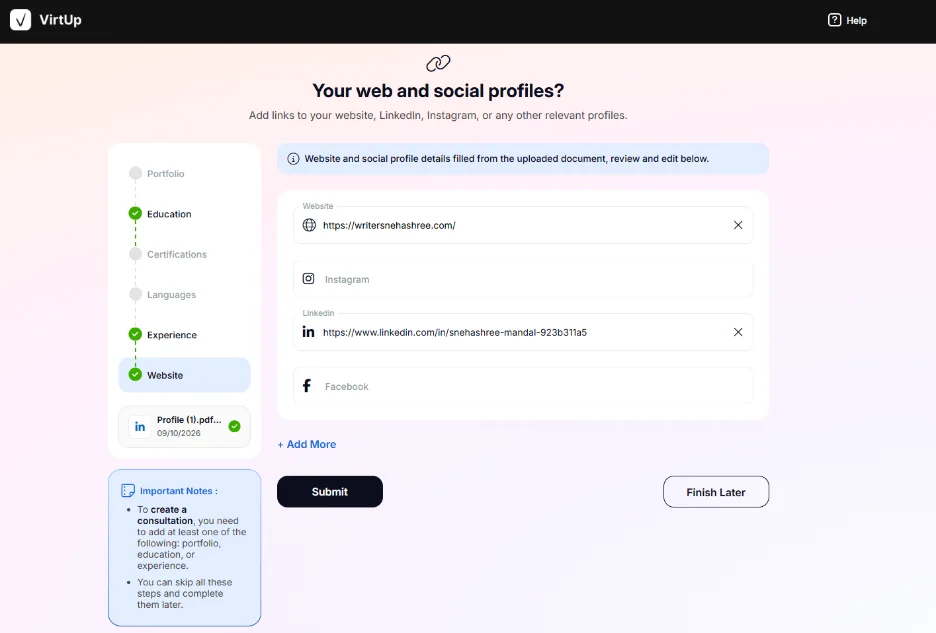
Add your website, Instagram, LinkedIn, and Facebook profile links here in this section. You can also click on the Add More button and then keep adding more social profiles and handles if you have any on any other platforms.
STEP 8: Click on the Submit Button
Once you have reviewed or added to all the sections, next click on the Submit tab.
Check all the screens carefully and read every section to ensure it’s good to go.
Since it’s your own story, reading it out should not take more than 5-10 minutes.
Your profile is complete, and you will next be taken to the Dashboard once you have clicked on the Submit tab.
How To Create Your Consultation Card?
To create your consultation card, here are the steps you will need to follow.
This is a manual process since VirtUp would want you to add every detail manually here to ensure it is 100% accurate and correct to your knowledge.
You must remember that if you operate as a coach and an AI consultant, it is good to create two different consultation cards since your work involves expertise in two different directions.
STEP 1: Click on the My Consultation Tab
The tab can be reached from your dashboard [My Consultation], and your profile [Add Consultation].
There are three different segments to match:
- Consultation Details
- Categorization and Discoverability
- Packaging and Pricing
In the Consultation Details segment, you will need to add any of the 9 images, or you could upload your own image.
Add a title and a description [character limit – 1000 characters] to it.
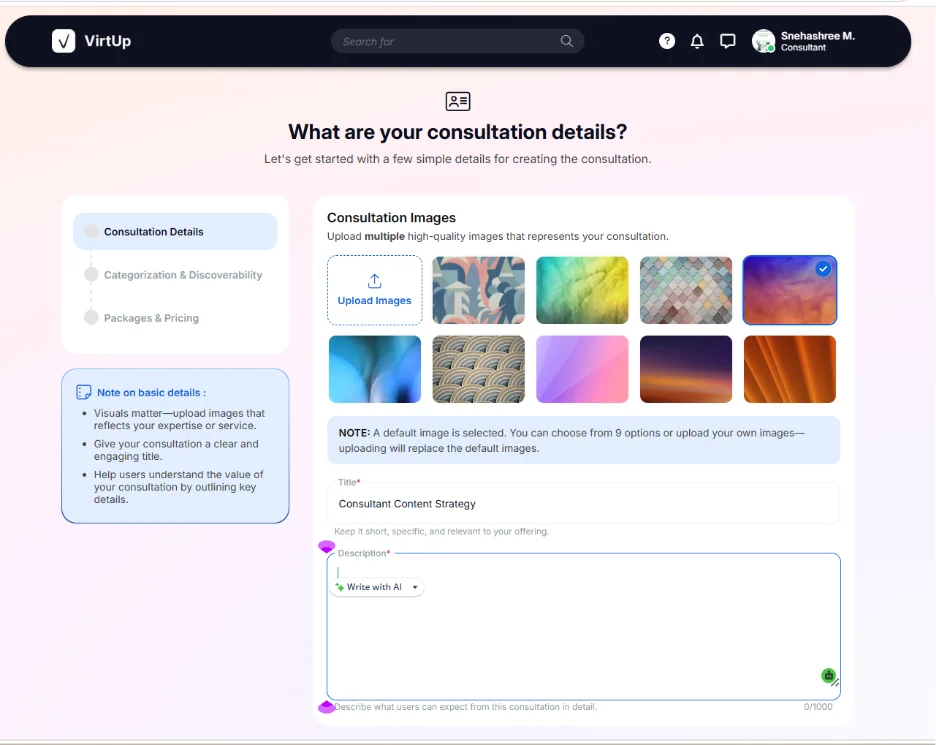
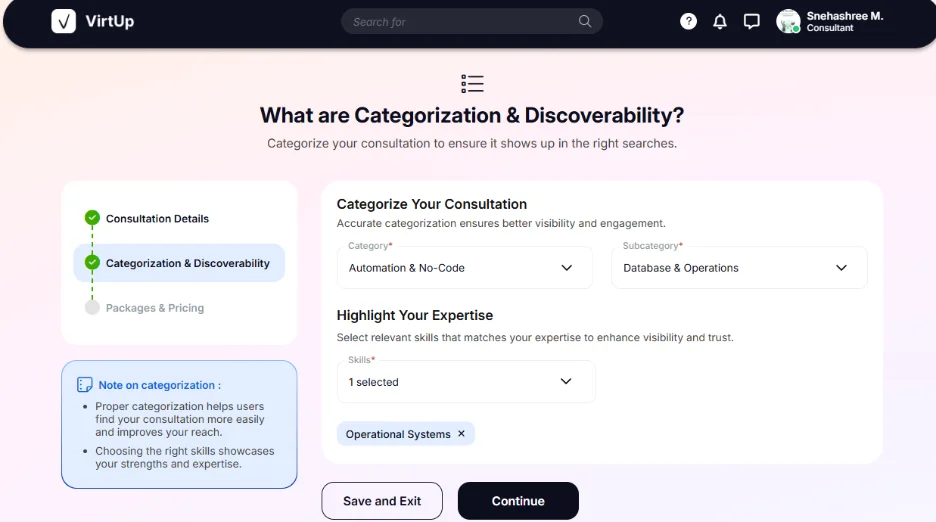
STEP 2: Go To Categories and Discoverability
Create a Category and a sub-category for your consultation.
Be specific!
Choose one category and an additional sub-category for the consultation.
Choose a pack of skills from the already available bunch of skillsets that match the category and sub-category.
STEP 3: Create the Packaging and Pricing Section Correctly
This is the most crucial section to attend.
Note: You can create a maximum of 3 pricing packages for the same consultation card.
If you are offering a service, your packages could involve a list of services which increase or decrease alongwith your pricing.
In every package, there are some sections to fill:
- Title: Add your Package title
- Duration: Time span of the consultation
- Price in USD: Calculate your pricing in USD
- Description: Add a brief description where you must highlight what you can do for a client in that particular segment. You can guide them to choose from the next two other packages as well in each package description.
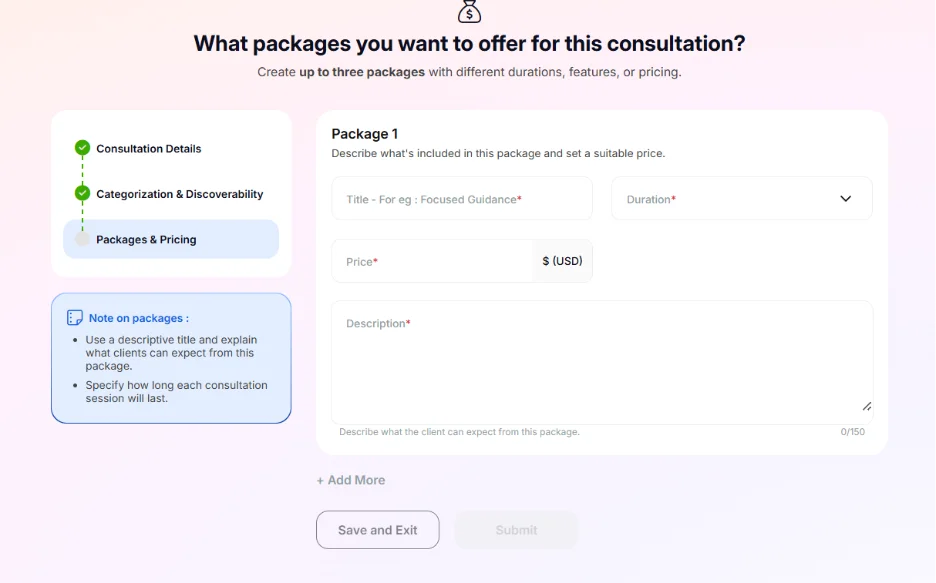
When you fill in Package 1, then the Add More tab gets activated.
You can add two more packages to complete the packages and pricing section.
Once done, the Submit tab gets activated, which means now you can submit your consultation card.
After you hit the Submit button, your consultation card is ready to get showcased to the clients who search for your kind of expertise and start getting flashed to these clients by the AI algorithm.
Isn’t it simpler to become a consultant with VirtUp?
Try It Out Today!